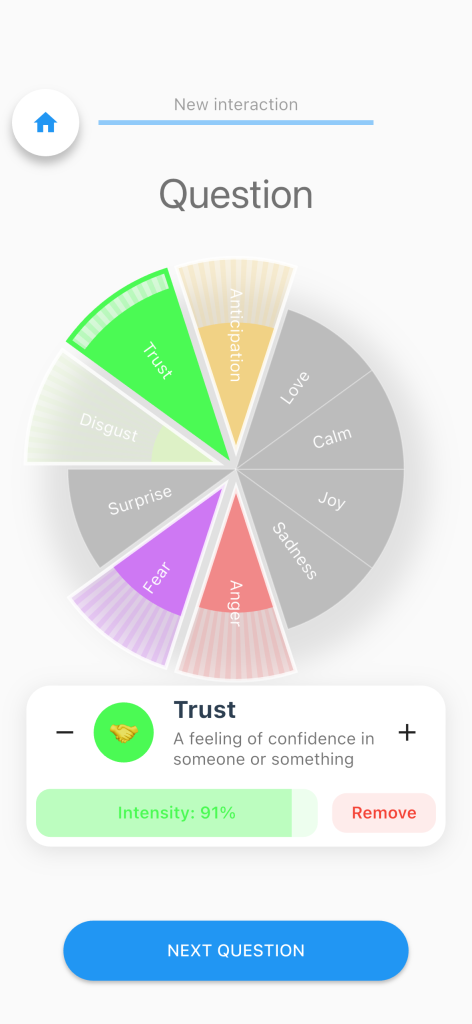
The Emotion Wheel question type is designed to let participants indicate the emotions they are currently experiencing. Participants can click on one or more emotions displayed on the wheel to express how they are feeling in real-time.
The Emotion Wheel can be configured to allow either multiple selections or a single selection, depending on the study requirements. When multiple selection is enabled, participants can select several emotions at once, each with its own intensity level. If single selection is enforced, only one emotion can be active at a time.

It is possible to assign each emotion a separate color, and optionally a secondary color that appears when the emotion is selected. Furthermore, each emotion can have a description and a label, which will be displayed when the emotion is selected, giving participants additional context or information about their choice.

Specific settings

An additional configuration option is the neutral selection, located at the center of the wheel. Selecting the neutral option will deselect all other emotions, providing participants a way to indicate that they feel neither positive nor negative emotions at that moment.

Each emotion can be assigned an intensity when using the option intensitySelectionEnabled, which participants can adjust by swiping their fingers on the selected emotion. This allows for a nuanced representation of emotional states, from mild to very strong feelings. They can also opt in to slide the intensity bar in the bottom of the information box or increase/decrease the intensity by one by tapping the + or – buttons. The option textIsWhite will show the emotions with white text instead of black.